Category Archives: News

Ryuzine for Comix

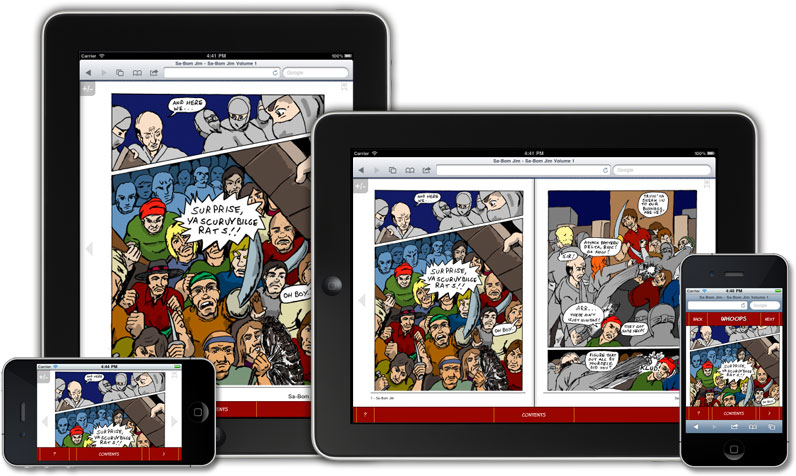
Comics in webapp automatically adapt to devices (artwork by Jon Sloan)

Our Ryuzine format was designed with indie web comics in mind, but also as a great way for independent creators to repurpose material they already have in an engaging way on desktop and mobile browsers.  The goal was to make reading a web comic as simple and familiar as flipping through the pages of an actual printed book while offering everything which makes the Internet so dynamic.

Best of all YOU are in charge with Ryuzine so you can create and distribute your comic online without needing a big publishing or distribution deal for a print version, and without having to get “approval” from an app store.

Check out the special Ryuzine Edition of Jon D. Sloan’s “Sa-Bom Jim” Issue #8.  This was the last regular print issue of the comic before he switched to doing web comics.  It demonstrates how easy it is to take an existing print comic and turn it into a simple Ryuzine comic!

Sa-Bom Jim #8 (Ryuzine Edition)

Compare these features to other comic reader apps:

  • Fill View option (+ auto-hide controls)
  • Right-Bound “Manga” Option
  • Mouse, Keyboard, and Touch navigation
  • Swipe Left/Right to flip page
  • Realistic page turning animation
  • Pan & Zoom on Touch devices
  • User Configurable View Settings
  • Single Page and Two-Page Spread views
  • In-App Bookmarking
  • Social Networking Widgets to share with friends
  • Add Bonus Content (gallery, audio, video, etc.)
  • No DRM
  • No App Stores – nothing to install
  • Runs in most modern web browsers
  • Cross-Platform Compatible
  • Fully Theme-able User Interface
  • FREE “Ryuzine Machine” Authoring Web App
  • No frameworks, no server-side code, no Flash required
Animations require a CSS3-capable browser.  Browsers tested include Internet Explorer 8+, Chrome 8+, Chrome Mobile (Android 2.3+), Safari 3+, Mobile Safari (iOS 3.x+), Firefox 3.5+, Firefox Mobile 4+, Opera 11.x+, webOSBrowser.  Platforms tested include Windows XP, Windows 7, Mac OSX Snow Leopard, Linux kernel 2.6, Android 2.3+, iOS 3.2+, HP webOS 3.0.4+.

Comixer 0.6 Released

Comixer 0.6 for both Linux and Mac (Leopard only for now) have been released and are available on the Downloads page.

This is a very minor bug-fix release to address the creation of books greater than 100 pages. It should be good for up to 1000 pages now, which is hopefully more pages than anyone should ever need.

Update: Also works with Snow Leopard 10.6.8!

You may need to manually rebuild imagemagick to get it to work though. There is a problem with libtiff but I resolved it by opening a terminal and typing:

fink rebuild imagemagick

If Fink isn’t working for you, though, you can try MacPorts instead: http://www.macports.org/index.php

Comixer works with Lulu!

I have not received any feedback from people who have downloaded Comixer as to whether or not PDF files created with it were acceptable to printing companies. I’m pleased to report there is finally a successful test case!

Jon D. Sloan, creator of “Sa-Bom Jim” has just assembled his first book of his web series. The book, titled “Sa-Bom Jim: A Watcher In Our Midst” is 6×9, 189 pages, grayscale, and perfect bound with a wrap-around cover. The original pages were US Letter size, but at low resolution so a smaller book size and the minimal print resolution of 150 dpi was used to make the pages look a little better in print than publishing the web images directly. Some of the pages, originally posted to his web site, were also in full color. To keep the price of the book low, though, Jon chose to convert those pages to grayscale. The colorspace conversion, page scaling, image compression, and PDF assembly were all handled automatically by Comixer! The files were accepted by Lulu and printed without any issues.

Jon’s project also exposed a bug regarding page counts higher than 100 pages and an issue with the CoverCreator that needed to be fixed – which led directly to the public release of version 0.6 and highlights how important it is to beta-test the program in real-world situations. Thanks Jon!

Jon’s book is available for purchase at his Lulu.com store page. Please consider buying it and supporting independent comic book creators.

Comixer Released for Mac OSX!

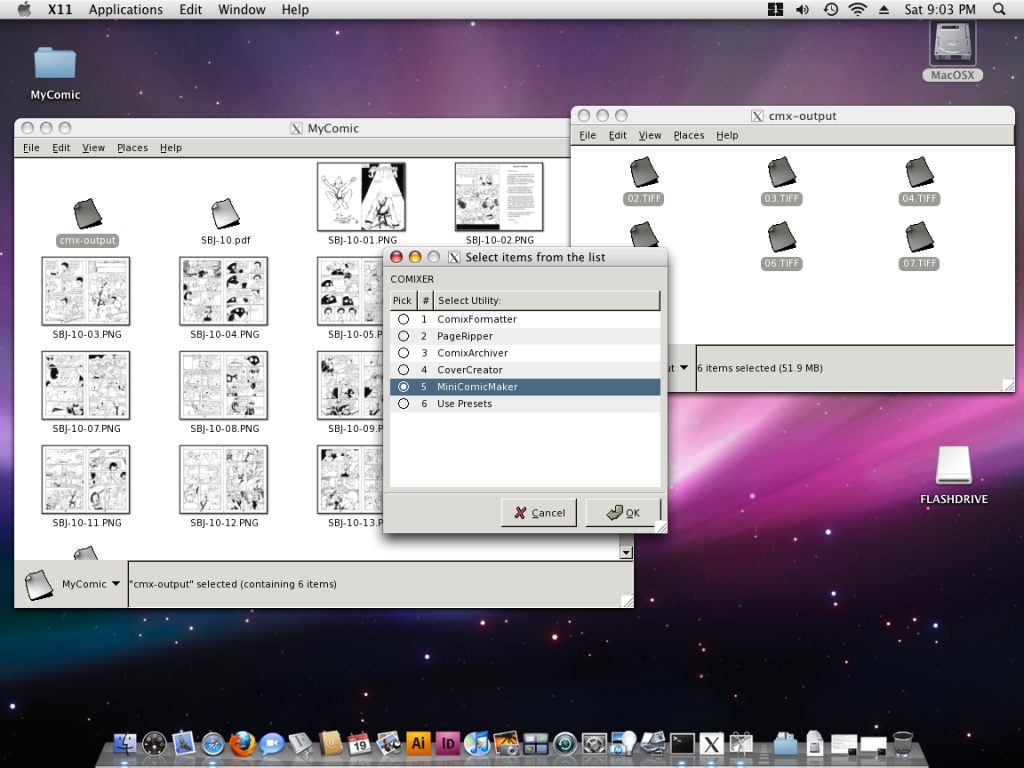
I’m pleased to announce that Comixer 0.5 is now available for, and working, on Mac OS X!  It requires that you have Apple’s Xcode Tools Developer SDK installed, the Fink port manager, and (of course) all the same dependencies Comixer has on Linux need to also be met on Mac – including using the Nautilus file manager, rather than the Finder.  So it isn’t a “Mac Native” Cocoa version, but it does work.  Here’s a screenshot to prove it:

The Downloads page has a DMG file you can download.  Just mount it, run the Install script and – assuming you’ve met all the system requirements and have your X server and Nautilus configured properly the rest is the same as using the program on Linux.  Well, not exactly the same!  The User Manual is set to open in Safari and PDF open in Preview, but other than that is the same.

The dmg download has an automated installer, but if it doesn’t work on your system for some reason there are full manual installation instructions are in the Forums.

(Tested under Mac OS X Leopard, not Snow Leopard, btw).