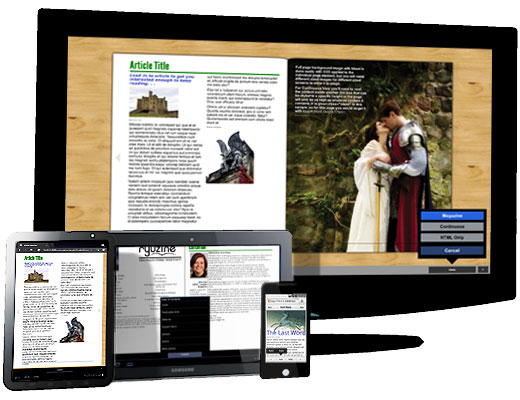
So, how do Ryuzine Writer and the Ryuzine reader web apps compare to the increasing competition in the self-service e-publishing sector? The following two tables show you how our web apps – both technically still in beta – stack up.
| AUTHORING APPS | Apple iBooks Author | Google Currents Producer | Amazon Kindle Direct Publishing | Amazon Kindle Publishing for Periodicals (beta) | Ryuzine Writer (beta) |
| Price | Free | Free | Free | Free | Free |
| Platform(s) | Mac OS X 10.7+ | Cross-Platform Webapp | Cross-Platform Webapp | Cross-Platform Webapp | Cross-Platform Webapp |
| Editor Interface | Drag & Drop WYSIWYG | WYSIWYG | Create/Edit in 3rd Party applications | Create/Edit in 3rd Party applications | WYSIWYG or use 3rd Party applications |
| Free Publications | Distribute anywhere | Publish to Google Currents | Not allowed | Not allowed | Distribute anywhere |
| Selling Your Publications | Only through iBookstore with approval by Apple, who take 30% of each sale* |
No options (yet) | Minimum list price, Amazon gets approval and may “reformat” books, and set sale price from which they take 30% |
Amazon must approve content and sets price, takes 30% |
One-time commercial license fee per title. Sell it anywhere you please at any price. |
| Reader Application | iBooks 2 on iPad only | Google Currents (iOS and Android only) | Kindle app/device | Kindle app/device | Popular web browsers |
| Templates | Yes | Yes | No | No | Yes |
| Export Options | iBooks, PDF, text | Currents format | Kindle Format | Kindle Format | HTML, ZIP** |
| Plugins / Widgets | No | No | No | No | Yes |
| Device Simulation | Yes | Yes | No | No | Yes |
| Insert Multimedia Content in publication | Yes | Yes | No | No | Yes |
* In order to sell through iBookstore you need to have an iBookstore Account, a copy of iTunes Producer, an active contract with iTunes Store, a bank account registered to recieve electronic payments from iTunes, an ISBN for each title, and a US Tax ID. Additionally, any .ibooks file you create with iBooks Author for sale cannot be sold anywhere but the iBookstore (terms apply to the file itself, not the content).
** ZIP export requires Ryuzine Writer is running from a localhost server with PHP 5.0+ installed and supporting zip and file operations. If you install XAMPP, as we recommend, you’re development server will meet the requirements.
| READER APPS | iBooks2 | Google Currents | Kindle | Adobe Acrobat Reader | Ryuzine (beta) |
| Price | Free (comes with iOS devices) | Free | Free | Free | Free |
| Platform(s) | iOS devices | iOS & Android | Cross-Platform | Cross-Platform | Cross-Platform WebApp |
| DRM Restricted | Yes | No | Yes | Some content | No |
| User Adjustable Text | Yes (size, font, background) | Yes (size) | Yes (size, leading, margins, background) | No | Yes (size, text/background colors) |
| Bookmark Your Place | Yes (automatic) | No | Yes (automatic) | Yes | Yes (manual) |
| Multiple Bookmarks | Yes | No | Yes | Yes | Yes (in-app & with browser) |
| Bookmark Syncing | Yes (via iCloud) | No | Yes (via Amazon’s service) | No | Yes (via any sync service) |
| Highlighting Text | Yes | No | Yes | Yes | Yes (via online services) |
| Annotation of Text | Yes | No | Yes | Yes | Yes (via online services) |
| Orientation Aware | Yes | Yes | Yes | Yes (mobile apps) | Yes |
| Two-Page Spread View | Yes (only on iPad) | No | No | Yes | Yes (screens > 1024px wide) |
| Adjusts to screen size | Not all content does | Yes | Yes (reflows text) | Yes | Yes |
| Multimedia Content | Yes | Yes | Yes (Format 8 on Kindle Fire) | Yes | Yes (including Flash) |
| Page Navigation | Swipe Page / Tap Margins / Table of Contents | Swipe Page / Button / Table of Contents Panel | Swipe Page / Tap Margins / Table of Contents (depends on book) |
Swipe Page / Tap Page / Buttons / Table of Contents Sidebar / Keyboard |
Swipe Page / Tap Margins / Button (phones) / Keyboard / Table of Contents Panel |
| Page Flip Effect | Yes | No | No | No | Yes |
| Social Networking / Share | Yes | Yes | Yes | Yes (for collaboration) | Yes |
| Theme-able User Interface | No | No | No | No | Yes |
| Search Text | Yes | Yes | Yes | Yes | Yes (with browser Find) |
| Alternate Viewing Modes | No | No | No | Yes (Continuous, Spreads, Reflow Text) | Yes (Continuous, HTML-only) |
During development of Ryuzine a decision was made to not reproduce within the app those features like searching text (which is built into the browser), bookmark syncing (built into some browsers or through third party services), and highlighting or annotation (also available through third party services). Ryuzine readers have the freedom to use any one of many plugins or online services to accomplish those tasks. Even within the web app itself publishers have the option of using any widgets, scripts, or plugins you want to use. No installations, no DRM, no App Stores. This is what the web is supposed to be like.
What About Professional Layout Software?
Quark XPress 9 ($899) can create magazine apps for the iPad and iPad 2. To publish and distribute through Apple’s App Store you also need a License Pack which varies in price from one issue ($349) to 24 issues ($6,799). Templates cost extra for a single issue ($149), multiple issues of one title ($749), and multiple issues of multiple titles ($1,499).
Adobe InDesign CS 5.5 ($699) users can also purchase the extra Adobe Digital Publishing Suite. The “Single Edition” ($395) can also create magazine apps for the iPad and iPad 2. “Professional Monthly Edition” ($495) creates them for iPad, iPad2, Android Tablets, Amazon Kindle Fire, BlackBerry Playbook, and Desktop. There is also a “Professional Edition Annual” ($5,940) and “Enterprise Edition” ($47,940).
Both these digital publishing options deliver content to the devices through the platform’s respective “app stores.” For iPad publications there is also the possibility Apple will reject the publication, and if you can’t distribute it in through their App Store you can’t distribute it for the iPad at all. Google, Amazon, and RIM’s apps stores are more forgiving, but you’re still asking your readers to purchase, download, and install a magazine on devices that often do not have a lot of storage space to spare. In addition to the overhead just to start publishing, for each sale, the app stores will also take a percentage of whatever you charge for the publication.
There are also now numerous online services for converting your existing content (either websites or PDF files – which need to be created with third-party authoring software) into HTML5 digital magazine webapps (or native apps). However, most of the free services only process RSS feeds to which you’ve subscribed, or insert their own advertising into the content. Some of these services are only available to publishers for a fee, and even others only to publishers who “partner” with the conversion service. These restrictions eliminate many of these services as options for small, independent publishers and self-publishers.
If your point is to get a digital magazine in the hands of your mobile and desktop readers and not spend a small fortune doing it, Ryuzine is your cost-effective solution. Distribution is via the web just like any other site, which also means Ryuzine targets a wide range of devices and platforms from desktops to tablets to phones.
- No app stores
- Nothing to install – the browser IS the “e-reader”
- No additional, expensive authoring programs (we give you Ryuzine Writer for FREE)
- No service charges to convert your WordPress blog to a digital magazine (our Ryuzine Press plugin is FREE)
- We never insert our own advertising into your content
- Publishing in Ryuzine format is FREE if you aren’t making money off of it
If you are making money from your Ryuzine publications, the “Commercial Use License” is an incredibly reasonable one-time flat fee per title – no matter how many issues of that title you may publish or how much revenue it generates for you.
As these two tables above demonstrate, the Ryuzine Writer and Ryuzine web apps offer publishing and reading experiences on par with (and we’d argue even better than) the other options presently available, but without the restrictions. So if you want to start putting together your own Ryuzine publications DOWNLOAD THE FREE PDK right now!
updated after 0.9.6.0 release