Tag Archives: Ryuzine

Ryuzine Writer PHP Patch

Note: This patch is included in Build 20131101.01, go to the Help > About screen in Ryuzine Writer to see the build number.  If you don’t see that number your install is outdated.

Issue:
PHP File Operations fail when Ryuzine Writer is being run from
a server with the latest version of PHP installed.

Cause:
The PHP files included with Ryuzine Writer utilize a form action
that is no longer supported by PHP. This old method was dropped
because it could expose forms to injection attacks.

Installation:

Download the Patch and unzip it.

Drag and drop all the files in the /patch folder to:

[Ryuzine PDK location]/DEV/ryuzinewriter/

For example, on our Mac OS X dev system it would be:

/Applications/XAMPP/xamppfiles/htdocs/Ryuzine_PDK_0.9.6.5/DEV/ryuzinewriter/

And replace/overwrite the PHP files already there.
Reload Ryuzine Writer in your web browser.

If you are still encountering PHP errors try to delete any “tmp” folder
that may be present in your Ryuzine PDK installation and reload the web app
in your web browser.

Patching Previous Versions

  1. Open each of the PHP files in the /ryuzinewriter sub-folder in a plain text or code editor
  2. Find the line with the <form> element (if present)
  3. Change action=“<?php echo $php_self ?>” to action=“”
  4. Save the file
  5. Reload the Ryuzine Writer web app in your browser

Printing Ryuzine Publications

Ryuzine publications are not really intended for printing, the whole point of the format is to create digital magazines or comics, not paper media versions.  That said, you can print out a Ryuzine publication, but the results will vary depending on how the publisher chose to lay out the pages.

You will need to go to the “Views” panel within the Ryuzine webapp and select either “Continuous” or “HTML Only” (depending, respectively, on whether you want to try and retain as much of the actual page layout as possible or if you really just want the text and images).  If you leave the “Views” setting on “Magazine” format, at best, you’ll only get a printout of the cover.

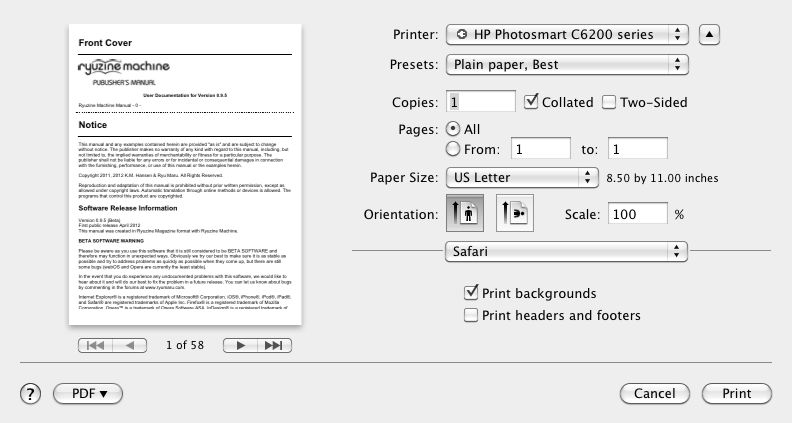
Then go to your web browser’s “Print” dialog.  You should also see a preview of how it will print.  Since each Ryzine page can be, like any web page, of infinite length it is likely the content on many pages will require more than one physical page to print.  You can make the pages fit a bit better by turning off the header and footer most browsers add to each page, and some browsers give you the option to “scale” the page for a better fit.  However, no matter what setting you use you will most likely not get a printed version you could bind into a physical book that looked like the digital version.

Pages with very little content and/or “full bleed” tiled background images may print as very short pages (the pages only “expand” in length as much as needed to show all the content, so empty – or nearly empty – pages are not very long).  Remember that printing to paper is not the intended output for Ryuzine publications.  They are intended for viewing in a web browser.

Note: the aforementioned information was included in the “Help” documentation within the webapp up to version 0.9.4 but was dropped in 0.9.5 even though the webapp still contains a print stylesheet.

Given that publishers have no control over what size of paper, resolution, or scale at which someone may try to print the publication it’s probably not worth the effort to try to create page layouts that will print in a specific way.  The print stylesheet is only very generally coded to fill the available space on the paper, however large or small that may be, and does not force page breaks after each Ryuzine page (in other words content from two pages may end up printed on one sheet).  It is not coded for printing to a specific size of paper and it will only utilize the “fallback” images unless you specifically add a print media query to your issue-specific stylesheet.  The “fallback” images are typically the same ones used in your two-page spreads at 1024 pixels wide.  Using that layout size as a guide it yields individual pages of 512 x 646 or 512 x 748 (if using “fillpad” option).  A sheet of US Letter paper @ 72 dpi is 612 x 792 and A4 is 595 x 842 so in theory any content which fits in a single, non-scrolling Ryuzine page when viewed in 1024 pixel wide two-page spreads should print on a single sheet of paper as well.

If you are a publisher and it is really important to you that people have a printer friendly version of your publication that will print exactly as you want it, you should build a PDF version in page layout software (such as QuarkXpress, InDesign, or Scribus) and provide a link to the alternative PDF version.

Ryuzine Vs. The Competition

So, how do Ryuzine Writer and the Ryuzine reader web apps compare to the increasing competition in the self-service e-publishing sector?  The following two tables show you how our web apps – both technically still in beta – stack up.

AUTHORING APPS Apple iBooks Author Google Currents Producer Amazon Kindle Direct Publishing Amazon Kindle Publishing for Periodicals (beta) Ryuzine Writer (beta)
Price Free Free Free Free Free
Platform(s) Mac OS X 10.7+ Cross-Platform Webapp Cross-Platform Webapp Cross-Platform Webapp Cross-Platform Webapp
Editor Interface Drag & Drop WYSIWYG  WYSIWYG Create/Edit in 3rd Party applications Create/Edit in 3rd Party applications WYSIWYG or use 3rd Party applications
Free Publications Distribute anywhere Publish to Google Currents Not allowed Not allowed Distribute anywhere
Selling Your Publications Only through iBookstore with approval by Apple,
who take 30% of each sale*
No options (yet) Minimum list price, Amazon gets approval and may
“reformat” books, and set sale price from which they
take 30%
Amazon must approve content and sets price, takes
30%
One-time commercial license fee per title. Sell
it anywhere you please at any price.
Reader Application iBooks 2 on iPad only Google Currents (iOS and Android only) Kindle app/device Kindle app/device Popular web browsers
Templates Yes Yes No No Yes
Export Options iBooks, PDF, text Currents format Kindle Format Kindle Format HTML, ZIP**
Plugins / Widgets No No No No Yes
Device Simulation Yes Yes No No Yes
Insert Multimedia Content in publication Yes Yes No No Yes

* In order to sell through iBookstore you need to have an iBookstore Account, a copy of iTunes Producer, an active contract with iTunes Store, a bank account registered to recieve electronic payments from iTunes, an ISBN for each title, and a US Tax ID. Additionally, any .ibooks file you create with iBooks Author for sale cannot be sold anywhere but the iBookstore (terms apply to the file itself, not the content).

** ZIP export requires Ryuzine Writer is running from a localhost server with PHP 5.0+ installed and supporting zip and file operations.  If you install XAMPP, as we recommend, you’re development server will meet the requirements.

READER APPS  iBooks2 Google Currents Kindle Adobe Acrobat Reader Ryuzine (beta)
Price Free (comes with iOS devices) Free Free Free Free
Platform(s) iOS devices iOS & Android Cross-Platform Cross-Platform Cross-Platform WebApp
DRM Restricted Yes No Yes Some content No
User Adjustable Text Yes (size, font, background) Yes (size) Yes (size, leading, margins, background) No Yes (size, text/background colors)
Bookmark Your Place Yes (automatic) No Yes (automatic) Yes Yes (manual)
Multiple Bookmarks Yes No Yes Yes Yes (in-app & with browser)
Bookmark Syncing Yes (via iCloud) No Yes (via Amazon’s service) No Yes (via any sync service)
Highlighting Text Yes No Yes Yes Yes (via online services)
Annotation of Text Yes No Yes Yes Yes (via online services)
Orientation Aware Yes Yes Yes Yes (mobile apps) Yes
Two-Page Spread View Yes (only on iPad) No No Yes Yes (screens > 1024px wide)
Adjusts to screen size Not all content does Yes Yes (reflows text) Yes Yes
Multimedia Content Yes Yes Yes (Format 8 on Kindle Fire) Yes Yes (including Flash)
Page Navigation Swipe Page / Tap Margins / Table of Contents Swipe Page / Button / Table of Contents Panel Swipe Page / Tap Margins / Table of Contents
(depends on book)
Swipe Page / Tap Page / Buttons / Table of
Contents Sidebar / Keyboard
Swipe Page / Tap Margins / Button (phones) /
Keyboard / Table of Contents Panel
Page Flip Effect Yes No No No Yes
Social Networking / Share Yes Yes Yes Yes (for collaboration) Yes
Theme-able User Interface No No No No Yes
Search Text Yes Yes Yes Yes Yes (with browser Find)
Alternate Viewing Modes No No No Yes (Continuous, Spreads, Reflow Text) Yes (Continuous, HTML-only)

During development of Ryuzine a decision was made to not reproduce within the app those features like searching text (which is built into the browser), bookmark syncing (built into some browsers or through third party services), and highlighting or annotation (also available through third party services).  Ryuzine readers have the freedom to use any one of many plugins or online services to accomplish those tasks.  Even within the web app itself publishers have the option of using any widgets, scripts, or plugins you want to use.  No installations, no DRM, no App Stores.  This is what the web is supposed to be like.

What About Professional Layout Software?

Quark XPress 9 ($899) can create magazine apps for the iPad and iPad 2.  To publish and distribute through Apple’s App Store you also need a License Pack which varies in price from one issue ($349) to 24 issues ($6,799).  Templates cost extra for a single issue ($149), multiple issues of one title ($749), and multiple issues of multiple titles ($1,499).

Adobe InDesign CS 5.5 ($699) users can also purchase the extra Adobe Digital Publishing Suite. The “Single Edition” ($395) can also create magazine apps for the iPad and iPad 2.  “Professional Monthly Edition” ($495) creates them for iPad, iPad2, Android Tablets, Amazon Kindle Fire, BlackBerry Playbook, and Desktop.  There is also a “Professional Edition Annual” ($5,940) and “Enterprise Edition” ($47,940).

Both these digital publishing options deliver content to the devices through the platform’s respective “app stores.”  For iPad publications there is also the possibility Apple will reject the publication, and if you can’t distribute it in through their App Store you can’t distribute it for the iPad at all.  Google, Amazon, and RIM’s apps stores are more forgiving, but you’re still asking your readers to purchase, download, and install a magazine on devices that often do not have a lot of storage space to spare.  In addition to the overhead just to start publishing, for each sale, the app stores will also take a percentage of whatever you charge for the publication.

There are also now numerous online services for converting your existing content (either websites or PDF files – which need to be created with third-party authoring software) into HTML5 digital magazine webapps (or native apps).  However, most of the free services only process RSS feeds to which you’ve subscribed, or insert their own advertising into the content.  Some of these services are only available to publishers for a fee, and even others only to publishers who “partner” with the conversion service.  These restrictions eliminate many of these services as options for small, independent publishers and self-publishers.


If your point is to get a digital magazine in the hands of your mobile and desktop readers and not spend a small fortune doing it, Ryuzine is your cost-effective solution.  Distribution is via the web just like any other site, which also means Ryuzine targets a wide range of devices and platforms from desktops to tablets to phones.

  • No app stores
  • Nothing to install – the browser IS the “e-reader”
  • No additional, expensive authoring programs (we give you Ryuzine Writer for FREE)
  • No service charges to convert your WordPress blog to a digital magazine (our Ryuzine Press plugin is FREE)
  • We never insert our own advertising into your content
  • Publishing in Ryuzine format is FREE if you aren’t making money off of it

If you are making money from your Ryuzine publications, the “Commercial Use License” is an incredibly reasonable one-time flat fee per title – no matter how many issues of that title you may publish or how much revenue it generates for you.

As these two tables above demonstrate, the Ryuzine Writer and Ryuzine web apps offer publishing and reading experiences on par with (and we’d argue even better than) the other options presently available, but without the restrictions.  So if you want to start putting together your own Ryuzine publications DOWNLOAD THE FREE PDK right now!

updated after 0.9.6.0 release
Ryuzine Unleashed!

Ryuzine™ is our very own digital magazine, newsletter, and comic book web app and you can use it for YOUR PROJECTS too!

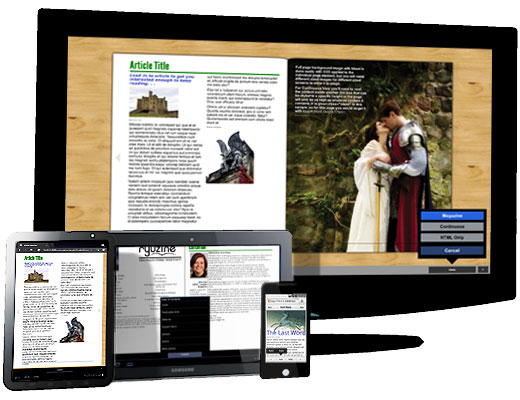
Ryuzine targets both desktop and mobile users whether they are using Windows, Mac OS, Linux, or viewing on an iOS, Android, Windows Phone 7.5, HP webOS, or BlackBerry Playbook device.  It’s the exact same file served up with a custom size and user interface.

Want to make your own Ryuzine?  Download the “Ryuzine™ Machine” – a free webapp that makes Ryuzine publications!  Compose right in the “what you see is what you get” editor, preview how it will look on various devices, then save and upload to your own web site and join the digital publishing revolution!

Ryuzine and Ryuzine Machine saw a ton of bug fixes and features added right before and after the first public Beta release. If you were lucky enough to try out the private Beta or tried out the first public release, here’s the changelog of what awaits you in 0.9.2:

Ryuzine Web App

  • Added ability to target webOS devices with custom theme
  • Set up optional features as “add-ons”
  • Fixed Share bubble for third party widgets
  • Added Zoom & Pan capability for mobile devices
  • Added User Configurable Options Panels with Cookie Preference storage
  • Meta Viewport now added dynamically based on device and settings
  • Rewrote page animation function to disable it for legacy browsers for better performance
  • Rewrote page flip function so links can contain anchor targets
  • Added ability to share link to specific page within magazine
  • Added In-App Bookmark feature
  • Separated page curves from themes as optional add-on
  • Switched UI animations from JS to CSS so themes can now change animation effects
  • Added more keyboard controls for panels and add/remove in-app bookmark
  • Added support for Windows Phone 7.5 devices
  • Added support for BlackBerry Playbook (BB Tablet OS 1.0.7)
  • Two-Page Spreads and Portrait views now available in Legacy Browsers
  • Added Internet Explorer 7 support (requires legacy_ie addon)
  • Page numbering position changes with binding/orientation
  • Phone Nav Page Count Limit bug fixed.

Ryuzine Machine Web App

  • Touch-enabled web app so it can be used on mobile devices
  • Added meta viewport data compatible with webOS
  • Added Toggle Button for Editor Panels
  • Added code to hide disabled toolbar buttons in Text Edit mode
  • Custom Device Profiles now persistent (stored in Cookie)
  • Option to import custom stylesheet for “My Styles” panel
  • Option to change default issue-specific style
  • In-Page Styles can now be preserved
  • Pop-Out option for Simulator (fills browser)
  • Added Output Options Panel
  • Automatically corrects for uneven page counts
FULL DETAILS on the Ryuzine Products Page

Ryuzine for Comix

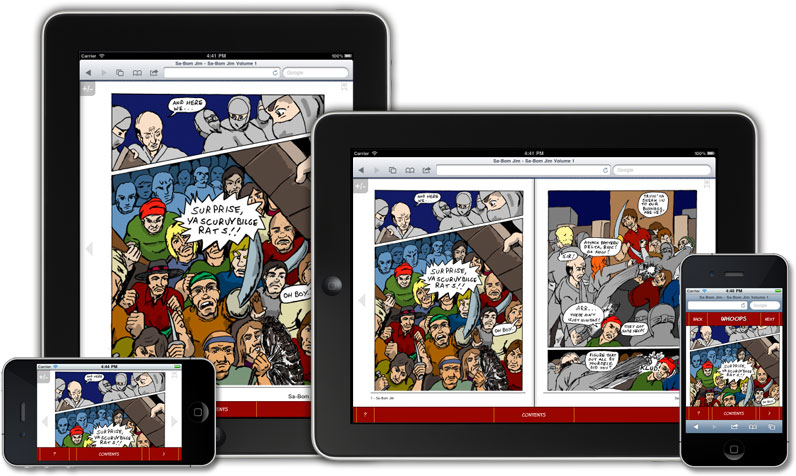
Comics in webapp automatically adapt to devices (artwork by Jon Sloan)

Our Ryuzine format was designed with indie web comics in mind, but also as a great way for independent creators to repurpose material they already have in an engaging way on desktop and mobile browsers.  The goal was to make reading a web comic as simple and familiar as flipping through the pages of an actual printed book while offering everything which makes the Internet so dynamic.

Best of all YOU are in charge with Ryuzine so you can create and distribute your comic online without needing a big publishing or distribution deal for a print version, and without having to get “approval” from an app store.

Check out the special Ryuzine Edition of Jon D. Sloan’s “Sa-Bom Jim” Issue #8.  This was the last regular print issue of the comic before he switched to doing web comics.  It demonstrates how easy it is to take an existing print comic and turn it into a simple Ryuzine comic!

Sa-Bom Jim #8 (Ryuzine Edition)

Compare these features to other comic reader apps:

  • Fill View option (+ auto-hide controls)
  • Right-Bound “Manga” Option
  • Mouse, Keyboard, and Touch navigation
  • Swipe Left/Right to flip page
  • Realistic page turning animation
  • Pan & Zoom on Touch devices
  • User Configurable View Settings
  • Single Page and Two-Page Spread views
  • In-App Bookmarking
  • Social Networking Widgets to share with friends
  • Add Bonus Content (gallery, audio, video, etc.)
  • No DRM
  • No App Stores – nothing to install
  • Runs in most modern web browsers
  • Cross-Platform Compatible
  • Fully Theme-able User Interface
  • FREE “Ryuzine Machine” Authoring Web App
  • No frameworks, no server-side code, no Flash required

Animations require a CSS3-capable browser.  Browsers tested include Internet Explorer 8+, Chrome 8+, Chrome Mobile (Android 2.3+), Safari 3+, Mobile Safari (iOS 3.x+), Firefox 3.5+, Firefox Mobile 4+, Opera 11.x+, webOSBrowser.  Platforms tested include Windows XP, Windows 7, Mac OSX Snow Leopard, Linux kernel 2.6, Android 2.3+, iOS 3.2+, HP webOS 3.0.4+.