SampleMag
A sample publication about Ryuzine in Ryuzine format demonstrating how to make a Ryuzine publication.
Welcome to the Ryuzine Sample Magazine!
SAMPLE PUBLICATION

Advertisement
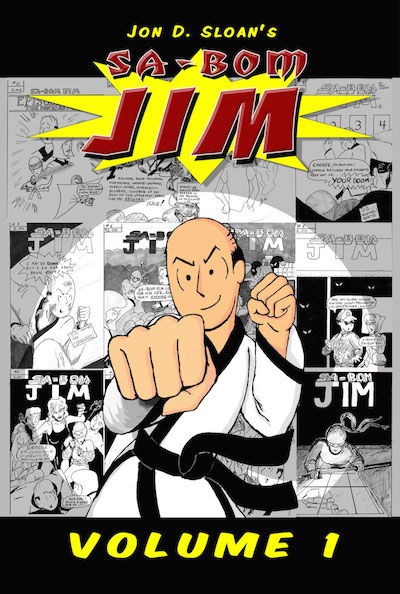
The original print series of "Sa-Bom Jim" has been collected in a single volume! Follow the exploits of Tae Kwon Do master instructor Jim Parker as he and his students tackle various ninja clans, the recurring appearance of Grandmaster Bombosto, and all sorts of martial arts hijinks!
This 412 page book contains all TEN of the original print issues plus five additional stories originally published in the Muscles & Fights and the limited edition Lutefisk Sushi box sets. Introduction by Bob Lipski, creator of Uptown Girl.
ONLY $20 BUY NOW

Published by Ryu Maru www.ryumaru.com
Copyright 2013 Jon D. Sloan, All Rights Reserved
Visit www.sa-bomjimcomic.com for new material three times a week!
Contents

Ryuzine SampleMag Issue #2
3 | Ryuzine History
5 | Rewrite! Rebuilding Writer
8 | Ryuzine Press
11 | About This Magazine
This is a sample magazine layout publication in Ryuzine format so publishers can see how it is put together and to inspire ideas for their own layouts and publications. It is bundled with the Ryuzine PDK and also available as a separate download.
Content is © COPYRIGHT 2015 K.M. Hansen, all rights reserved. You may download, send, and share this publication freely. It may not be sold or bundled with other software for sale. Individual photos, and artwork are the intellectual property of their respective owners and are used by permission. "Ryuzine" is a trademark of K.M. Hansen and Ryu Maru.
Design Notes: The links above and on the cover are set like “#page5” which are automatically converted so they trigger the page flip function and the web app URL it creates simply ends in anchor link “#5”. Look for additional design notes throughout this magazine.
Ryuzine History
by K.M. Hansen, the Creator of Ryuzine

The original Ryuzine logo
I had returned to school to learn the print media side of Graphic Design after many years in Web Design/Development. I originally wanted to create a single-HTML file portfolio of my print work, and thought it would be neat if the reader could flip through the pages like a real book.
You may have seen the 3D catalogs or magazines where you click on the curled page corner and sort of "peel" it over to reveal the next page? They are kind of slick - and faithfully reproduce your print layout, and I could've made one really easily with Adobe InDesign - but viewing requires Flash plugin.
At that time things were changing rapidly in the web world. HTML5 was being implemented so quickly in browsers it was becoming a de facto standard even though it was still a "working draft." CSS3 was similarly in flux, or at least the parts meant to replace Flash. Founder and then CEO of Apple, Steve Jobs, famously wrote an "open letter" criticizing Adobe's Flash and touting HTML5, CSS3, and Javascript as open-source replacements. Or, more succinctly stated, "Flash is dead."
The tide in the web industry was also moving against Flash. Obviously Apple's mobile devices didn't support Flash, but neither did Windows Phone, Blackberry, or WebOS. Android briefly had Flash support, but due to security, performance, and energy usage issues Adobe ultimately abandoned their Flash port (actually they abandoned support for ALL Linux-based systems).
I wanted to create a webapp version of my portfolio that would work on desktops, smartphones, and tablets. So it was obvious that meant HTML5, CSS3, and Javascript since Flash wasn't supported. I realized it would be even cooler if the webapp UI was a template that could swap out the content - then it could be used for a portfolio, magazine, newsletter, or comic - without the need for a dedicated "reader" app, since it ran inside a browser.
The project was originally called "MagIzine" and spent a month or two in alpha being run locally off the hard drive before I started working with it on a web server in beta. The authoring app (originally called "WebappMaker" but released as "Ryuzine Machine") actually came after the documents it can create and edit.
The "About" screen from WebAppMaker
My original notion was to make it as cross-platform and cross-browser compatible as I possibly could, rendering some kind of content for people still inexplicably using Firefox 3.5 or Internet Explorer 5 and phones almost nobody owned…or whatever. I wanted it to be as "device independent" as I could make it, but in the long run it proved too much to maintain and test - and all the extra code required to accommodate so many eventualities bogged down performance. I had to ask myself why was I trying to support platforms and devices when their original creators had abandoned them? Ultimately it's the cool features available in modern browsers that make Ryuzine an engaging experience, so the newer versions focused on compatibility with current browsers and devices, with backwards compatibility for only one or two of the previous versions.
continued on next page…
Ryuzine History
The earliest versions didn't have a WYSIWYG editor, just an empty text area for hand coding. I later added some macros to generate some of the most used elements. When you'd "Build" a publication it built everything for the UI too - the only things "dynamic" about it were the CSS3 media queries that adjusted the elements for different screen sizes.
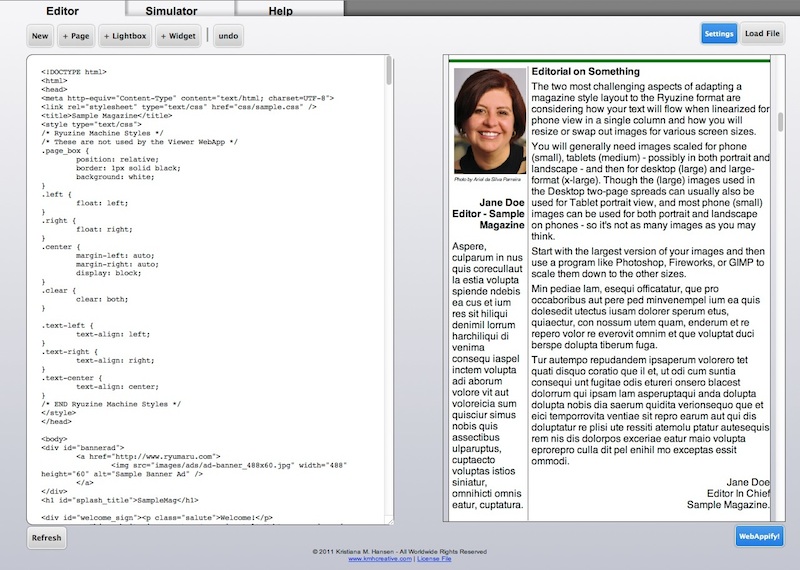
Ryuzine Machine v0.9.0 Editor
I decided to release a public beta through the Ryu Maru website, which was already hosting a couple of my other projects. "Ryuzine" version 0.9.2 launched on Halloween night 2011 - not that I picked that date for any particular reason, though I was appropriately afraid to put it out there. Afterwards I was releasing updates - sometimes with major changes and breaking backwards-compatibility, on average every three or four months. I started to feel like I was burning through version numbers too quickly, and so after 0.9.5 added a fourth digit for the "revision" number.

Original Ryuzine Icon Designs
The Ryuzine Press Plugin for WordPress came along in March 2012 as an alternative to the authoring webapp. It allows someone operating a WordPress blog to create "curated" Ryuzine editions by selecting blog content and bridging it into the Ryuzine reader webapp. The Ryuzine Rack newsstand webapp was released exactly a year after the first public beta. Ryuzine Machine was also renamed to "Ryuzine Writer" - to better reflect its purpose. At version 0.9.6.0 Ryuzine had become a "family" of webapps.
This update to version 1.0 finally brings that family out of beta, and it has been a long time coming! The last public beta released was Ryuzine Press 0.9.6.8 on 10 February 2014. Since then all four of the Ryuzine webapps have undergone a nearly complete rewrite optimizing and pulling out legacy code, building a more robust Add-On API, and adding new features and themes.

New Ryuzine Icon Designs (left to right) Reader, Writer, Rack, and Press
I hope you'll find it was worth the wait! A full change log is bundled with the webapps, but on the following pages you'll find highlighted some of the biggest and coolest changes in Ryuzine Writer, Ryuzine Reader, Ryuzine Rack, and Ryuzine Press.
All four Ryuzine apps are available as FREE open-source software for both personal and commercial use.
Rewrite!
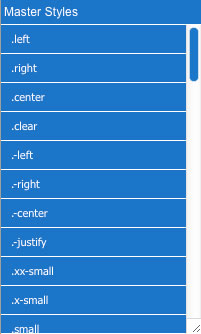 The biggest changes to Ryuzine Writer can be found in the core function of the webapp - the Editor tab where you author your Ryuzine publications.
The first thing existing users of Writer will notice is that it no longer asks you for the name of an Issue-Specific Stylesheet on launch. The "My Styles" panel within the editor has been completely reworked and is now split into two different style managers, a "Master Styles" panel intended for classes you use in all of your publications and a "Edition Styles," which is meant for classes exclusive to a specific edition of your publication. Both of these can load and change the stylesheets whenever you need to, without having to reload Ryuzine Writer.
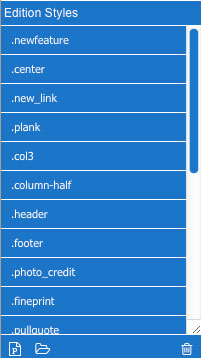 In addition to being able to load existing external stylesheets, the "Edition Styles" panel can also be used to create and delete individual styles from within the Editor. Click on the [P] button at the bottom and you'll be greeted by the "Add New Style" dialog, which easily walks you through the creation of new classes without having to know anything about coding CSS. If you do know how to code it, though, the generated code is also shown in the dialog and can be directly edited manually before being submitted to the panel. If you submitted too soon, or an imported stylesheet has a class you no longer need, just select it in the panel and hit the trash icon. Being able to load, create, and modify styles is a pretty basic feature of any page layout software, and now in version 1.0 Ryuzine Writer has it too!
(continued on p. 6)
Design Notes: the “page” DIV for this and the facing page have a blue color set for the background with a non-repeating image at the top (set to top left on this page and top right on the facing page, creating a “crossover image” effect, just like a real magazine). The default text color of black is also over-ridden with white. The “header” DIVs have been modified for tablets and desktops with a greater height, which also necessitated targeting the “live” DIV elements and changing their “top” coordinate so they don’t scroll over the now taller headers. Take a look at the “page#5” and “page#6” rules in the “newsample.css” stylesheet to see specifically how this was done.
Rebuilding Writer
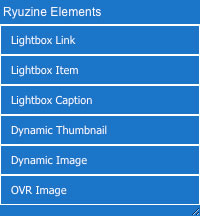 If you've used Ryuzine Writer in beta you'll notice another change to the Editor panels: the "Ryuzine Elements" panel has a lot fewer items in it now. In the old version it contained both unique elements and non-unique elements. As "unique" implies, you could only have one of each of those elements in your publication. However, the old Elements panel allowed you to add as many as you liked (the Ryuzine Reader script, however, would ignore all but the first one in the document).
All the unique elements are now part of the new "Document Properties" dialog, which is available from under the File Menu. It is now from this dialog that you can also control aspects of your publication like the Title, Author, Copyright Notice. When you open a file in the Editor it will pull any of the existing data into the dialog. Publications created with the beta versions, however, will be missing things like new App Logo, Description, or Keywords. Within the Editor composition area you can toggle the visibility of the unique items with the  icon in the toolbar.
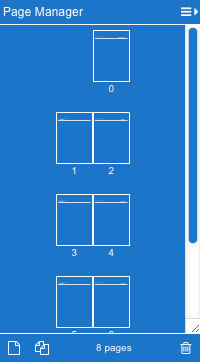 However, the biggest new addition to the Editor is the "Page Manager." Professional page layout programs used in the print media industry allow the designer to easily see how their pages lay out in relation to one another, and easily add/delete and drag-to-reorder the pages. All of those features are now available in the "Page Manager" panel. It also give authors the ability to change the size of the page thumbnails, show individual or facing pages (either left or right bound), and a "continuous" view which is a much better representation of the same view within Ryuzine Reader.
Lastly, if you are using a Mac or Linux system, you no longer need to know anything about installing or configuring a web server in order to use Ryuzine Writer. It still needs to run from a web server, but it now leverages the integrated web server in PHP, which allows you to put your Ryuzine Development folder anywhere you please and deal with it like any other folder on your computer. Double-click the "_start" script and it will fire up the PHP web server and automatically launch Ryuzine Writer your default browser. Of course you can still install it on any development server (this is the only option for Windows users), which is necessary if you also want to access Ryuzine Writer or test your publications over your LAN.
Ryuzine Reader & Rack
Both Ryuzine Reader and the newsstand app, Ryuzine Rack, now also utilize the (new) Add-On API. This has allowed some previously integrated features (namely iScroll and the Lightbox) to be extricated and made optional. This new Add-On API also allows third parties to easily add new user interface elements like buttons and panels. For example, in the beta version if you didn't have a third-party social media sharing widget the "Share" bubble would just have a text field to enter e-mail addresses. That has been completely replaced by a default widget for sharing your Ryuzine publications or newsstand on all the popular social media sites. However, if you still have a social media widget you like you can still use that instead. Ryuzine 1.0 offers more options and flexibility for publishers than any of the beta releases.
Both webapps also have a completely redesigned User Interface that no longer requires readers to navigate to sub-menus for things like changing the Views, Fonts Size, or Options. The new UI also now uses an icon font to decorate the buttons and theme creators can choose whether to display the icon, button text, or both.
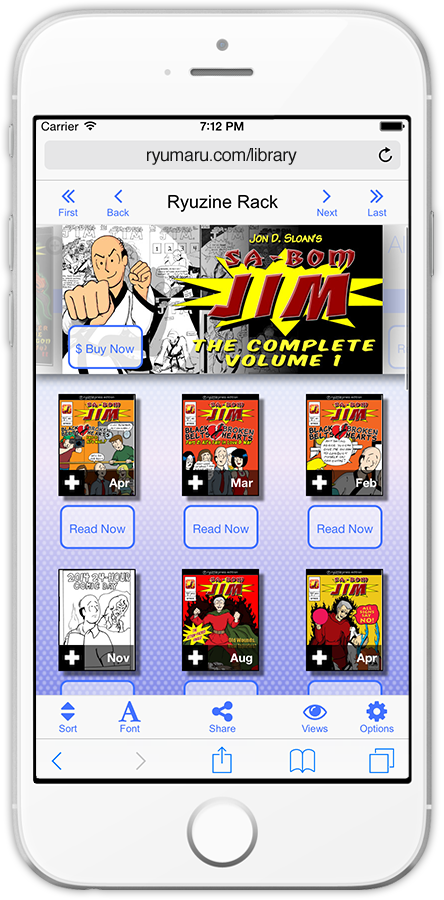
Complimenting this new UI is a reworked Theme system that makes customizing your publications easier than ever before with support for "Child Themes." Child Themes pull in an existing theme and then modify it - so the child theme file only has the changes you want to make. Version 1.0 offers updated versions of some of the older themes and some new ones too!
If you are using the Ryuzine Rack option to open links "in-app" your readers will now be able to access and manage their complete Ryuzine Rack Reading List from the Drop Bar. The list also obeys whatever View setting has been set for Rack pages.
The "Featured" carousel's automatically generated promotions also got some attention with new styling that makes them look more like advertisements. Prior versions simply displayed the same layout as the Item Description "cards." Of course you can also still create custom promotional images for the carousel instead of using the auto-generated ones.
In addition to all the aesthetic changes there were many, many changes and improvements "under the hood." If you want to know all the details check out the "Change Log" that ships with the webapps.
Ryuzine Press
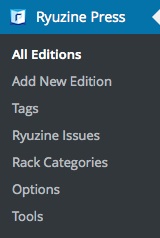 The Ryuzine Press plugin for WordPress acts as a "bridge" between blog posts and the Ryuzine webapp, so when you install or upgrade to version 1.0 of course you'll also get all the new features of Ryuzine Reader and Rack. But the plugin itself saw some improvement too!
Custom "App Icons" no longer have to be scaled to specific sizes. You can now use any image in your WordPress Media Library and it will be automatically scaled to the correct sizes for use as an app icon.
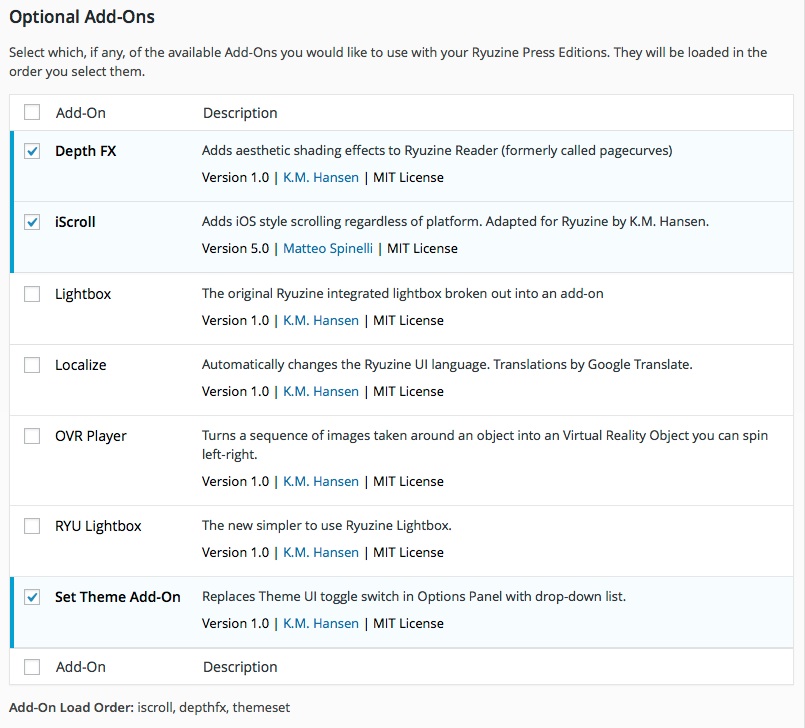
Enabling and disabling Ryuzine Add-Ons is now presented in a list similar to how you activate/deactivate WordPress plugins. It also allows you to adjust the order in which the Add-Ons will load, for example, if you have one add-on with a dependency on another you can make sure the required resource loads first.
This new Add-On system not only reduces the learning curve for users already familiar with the WordPress backend, it also gives you a lot more information than the old, simple checkboxes did. Ryuzine Press now not only checks which Add-Ons are available it also reads the information block for each add-on so you have something more to go on than just the add-on's folder name.
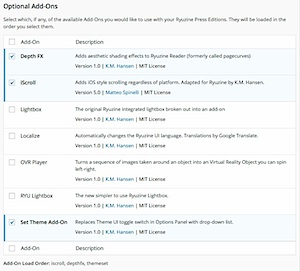
New Add-On Section in Ryuzine Press 1.0
There was also some code clean-up and minor bug fixes, particularly one in the Ryuzine Press implementation of Ryuzine Rack that prevented more than ten Ryuzine Press Editions from appearing in your newsstand. If you skipped some of the plugin's updates and want to take advantage of all this updated goodness you can still use the Ryuzine Press Migrator plugin to move your pre-0.9.6.6 editions to Version 1.0.
Design Notes: The “New Add-Ons” image above is linked to a larger one embedded at the end of this document, while the other light boxed images in this magazine are direct links to media. Consequently, this is the *only* one that will work with the old lightbox add-on (because it requires all detail images be embedded at the end of the Ryuzine) while the new “ryulightbox” add-on is able to handle both directly linked media and embedded content.
Interview with Jon Sloan
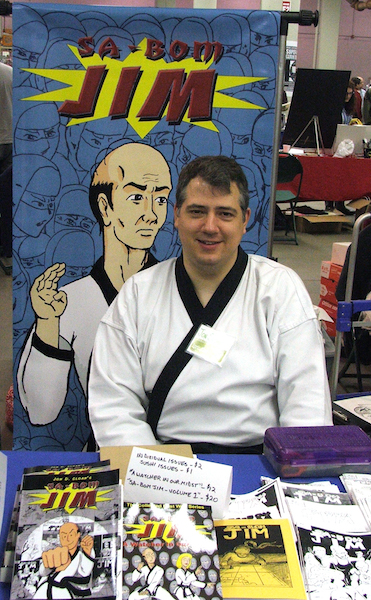
Jon Sloan is an artist and the creator of the "Sa-Bom Jim" comic, which he began drawing in 2004. Wow, that's 11 years now and still going strong! Since 2012 Jon's WordPress-powered website (which, full disclosure, is also hosted and maintained by Ryu Maru) has been beta testing the Ryuzine webapps and plugin. Now that Version 1.0 is here we were interested to hear Jon's thoughts about both his webcomic and Ryuzine.
Q. So, for the uninitiated, what is your webcomic about?
"Sa-Bom Jim" (Master Instructor Jim) is a comic about James Parker, a Tae Kwon Do instructor, and all the crazy things that happen to him and his students. These run the gamut from ninja attacks every Tuesday at 6:30, to time-travelling dragons, dating show disasters, and all sorts of weird ideas that I try to squeeze into this little universe I've created.
Q. How often are you publishing new material to your website?
I used to post strips twice a week, but as of this last January, I've posted three times a week (Monday, Wednesday, Friday).
Q. So is your webcomic scans of hand-drawn pages? Digital artwork? What is your process?
After I start with my script (keeping a script keeps me focused and doesn't let me wander too much), I hand draw all of my strips. I have tried to digitally draw them, but that doesn't feel as natural to me as putting pencil to paper. I hand-ink my strips as well, and this is the area I've been trying to improve on. Finally I scan the finished strips into Photoshop where they get digitally cleaned up and colored. I have also recently added digital fonts for the dialogue, because it makes the strip look cleaner and easier to read.
Q. What would you say are some of the biggest challenges in doing a webcomic like yours?
Time is the biggest hurdle! With a full-time job and occasionally a part-time job as well, I don't get as much time to devote to my work that I want to. Ideas for the strip do pose a challenge from time to time, but I've gotten to a point where my characters have established so much of their own personalities in my head that it's easier for me to figure out how they would act in a certain situation.
Q. What were your first impressions of Ryuzine and Ryuzine Press?
I was first struck by how the format looked, especially watching the "pages" turn. The bookmarking feature was interesting, letting you pick up where you left off in reading as opposed to starting at the beginning and wading through all that material to find your place again. All-in-all, I've been impressed with how it looks and performs.
(continued on p. 10)
Design Notes: The images at the bottom of this page and the facing page are background attachments to the “page” DIV on desktops and tablets, but using media queries to target smaller screens they are attached to the “live” DIV on phones so the images will scroll with the content instead of remaining fixed to the bottom of the pages.
Jon Sloan on Ryuzine
 Q. How often are you releasing Ryuzine Press Editions of your webcomic?
Essentially every time a chapter of a story is concluded. This helps people catch up to a certain storyline as well as read previous material.
Q. Has anyone commented to you directly about the Ryuzine Press Editions of your comic?
Yes. I do a podcast with three other friends called "Son of The Geek Report" (http://klonkomedia.com/) and one of the episodes* one of [the other hosts] did bring up Ryuzine during the show…I did talk about [Ryuzine] and promote it.
[* Unfortunately, due to technical problems the podcast episode is not available - Editor]
Q. Your website also replaced the "Store" with the Ryuzine Rack newsstand webapp, briefly what are your impressions of it?
It makes the product look more accessible than just trying to click on a word link in a sidebar. It's cool that people get a chance to see some cover art, as if they're looking at a real news stand.
Q. Do you think the Ryuzine Press Editions of your webcomic and the Ryuzine Rack newsstand have been a useful addition to your website?
Yes, as I said earlier, it makes catching up easier for readers, and it adds [something] to the site that a lot of other webcomics don't have.
Q. Would you recommend other webcomics artist consider creating Ryuzine versions of their work?
Definitely! It's a nice way to release previous material in a great looking package.
Q. Where can the comic reading public expect to purchase them and give you feedback?
They can look online at lulu.com, or you can see me at local conventions such as Midwest Comic Book Association conventions (MSP ComicCon and MSP Fall ComicCon).
As far as giving me feedback, I encourage people to PLEASE give me feedback in the comments section of my website: www.sa-bomjimcomic.com!
Q. Any final thoughts you'd like to share?
I don't see any end point for Sa-Bom Jim, and it's become quite the labor of love. Please read my comic, and send me feedback so I don't feel like I'm a weird voice in the wilderness.
Thanks, Jon! Historically, according to the stats for the Sa-Bom Jim website, the most popular content both in terms of unique visits and reader retention have been the Ryuzine Press Editions. So if you are running a WordPress powered webcomic consider using the Ryuzine Press plugin to publish your comics as real page-turners!
If you're not publishing on a blog you can still create engaging Ryuzine editions of your work with Ryuzine Writer - which now has webcomic-specific functions built into the Template Wizard.
Images courtesy and ©Jon D. Sloan - all worldwide rights reserved, used by permission.
About this Magazine
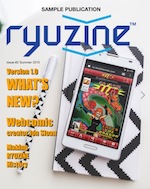 This publication was actually created with Ryuzine Writer and the original "work in progress" file is provided in the project download so you can see how it was put together. Hopefully this will help you learn how to assemble your own newsletters and magazines in Ryuzine format.
The first SampleMag, released with the first public beta of Ryuzine, was just a collection of free stock images and gibberish text. It had actually been created more to test the Ryuzine web app's processing than intended for use as a template for publications or to present useful information to its readers.
While Ryuzine Writer is a full HTML editor it is still has somewhat limited tools for creating and editing stylesheets. Specifically the Master and Edition Styles panels will not import styles for unique or compound elements, or styles inside of media query blocks. If you've looked at the "newsample.css" stylesheet you'll have noticed targeting elements by their ID is a powerful way to take control of your layouts, and the Ryuzine format purposely assigns a unique ID to every part of the layout template expressly for that purpose.
It is not readily apparent, but while working on a publication you can go to Editor > Format > Issue Styles > CSS Export Box, then Build your publication, and then you can go to the Export > CSS box and directly create/edit your Master Stylesheet. Go back to Editor > Build each time you want to update and see your changes.
Edition Styles can similarly be created and edited within Ryuzine Writer. If you're not very familiar with how to write CSS code the Edition Styles Panel "P" button will open the "Add New Style" wizard. Simply select the options you want and it will write the code block for you. Submit and it is written into your "wip_" file. You can also manually edit this code by switching the Editor to Source mode (third toolbar button from the left).
This, however, is a bit clumsy and editing the CSS in the Export box or in Source mode is very basic. A preferred workflow would be to use external stylesheets and have them open for editing in a proper code editor. You simply re-save your stylesheet and then jump back to Ryuzine Writer and rebuild the publication to see the changes in the Simulator.
One of the goals of the version 1.0 release of Ryuzine Writer was to offer authors more of the kinds of features found in professional page layout programs like QuarkXpress, Adobe InDesign, or Scribus. With the addition of Master and Edition styles, and especially the new Page Manager, the editor has come a long way in a short time. And now that it's an open source project anyone can help continue improving it and publishers can use it freely to (hopefully) produce lots of cool Ryuzine publications!
Design Notes: Within the Reader web app if you change the color scheme in the Fonts Panel to “Sepia” or “Black” you’ll notice that pages 5 and 6 remain white text on a blue background and the back cover remains black text on a white background. However, pages 9 and 10 will change the background and text color, but the background images will remain untouched. That’s because the Color Scheme set in the Font Panel will not override the author’s specific intent for how elements of a page should look. Another example is the “Contents” page where the header and footer remain blue with white text while the middle part of the page complies with the selected color scheme. That’s because, on that page, the header and footer have been styled specifically. The color scheme will now ONLY override elements that inherit the default appearance.
Advertisement
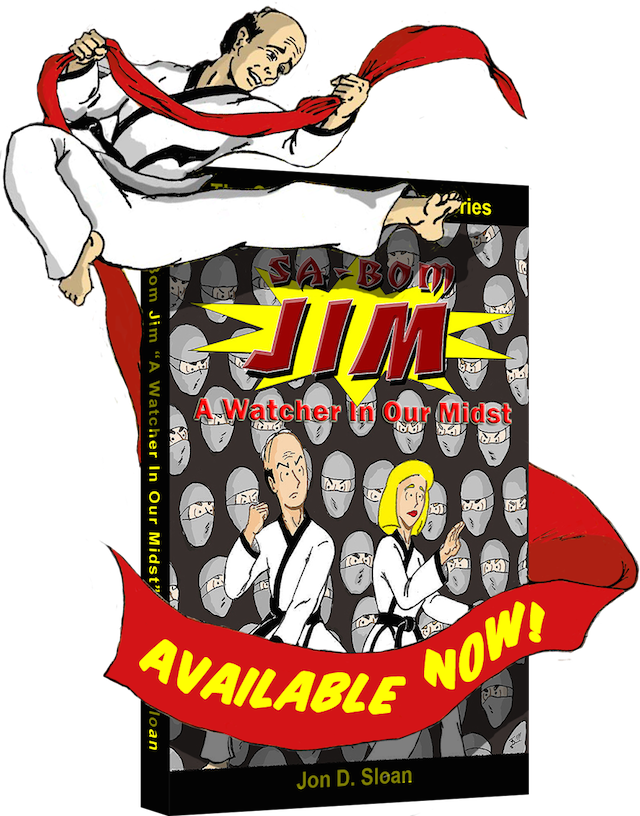
The Ninja Clans have decided to infiltrate Sa-Bom Jim's training hall through a new initiate, Rick Blevins. Will this newcomer be the deciding factor that will bring down Jim's school? Or will Rick be swayed to renounce his ties to the Ninja at his peril?
Find out in "Sa-Bom Jim: A Watcher In Our Midst" which collects the complete Volume 2 story arc of the first web series in a 186 page black & white 6×9 trade paperback.
BUY NOW ONLY $12
Copyright 2011 Jon D. Sloan, All Rights Reserved
Visit www.sa-bomjimcomic.com for new material three times a week!
Advertisement

GOOD NEWS!
Ryuzine™ Rack is the FREE, open source newsstand webapp. Promote your own Ryuzine format publications, link to online store product pages, PDF files, eBooks, downloads, other websites - it's up to you! There's No submission for approval, no DRM, no item limits. Ryuzine Rack runs right in your readers' browsers and doesn't require any database backend on your server.
DOWNLOAD TODAY
 The "Ryuzine" name and logos are trademarks of K.M. Hansen and Ryu Maru
www.ryumaru.com Photo credit Stew Dean 1990 CC-BY-2.0
Thank you for reading!
Table of Contents
Appendix: Gallery
Lightbox Gallery Item:
©2015 Ryu Maru - All Worldwide Rights Reserved
